Thermostat relays
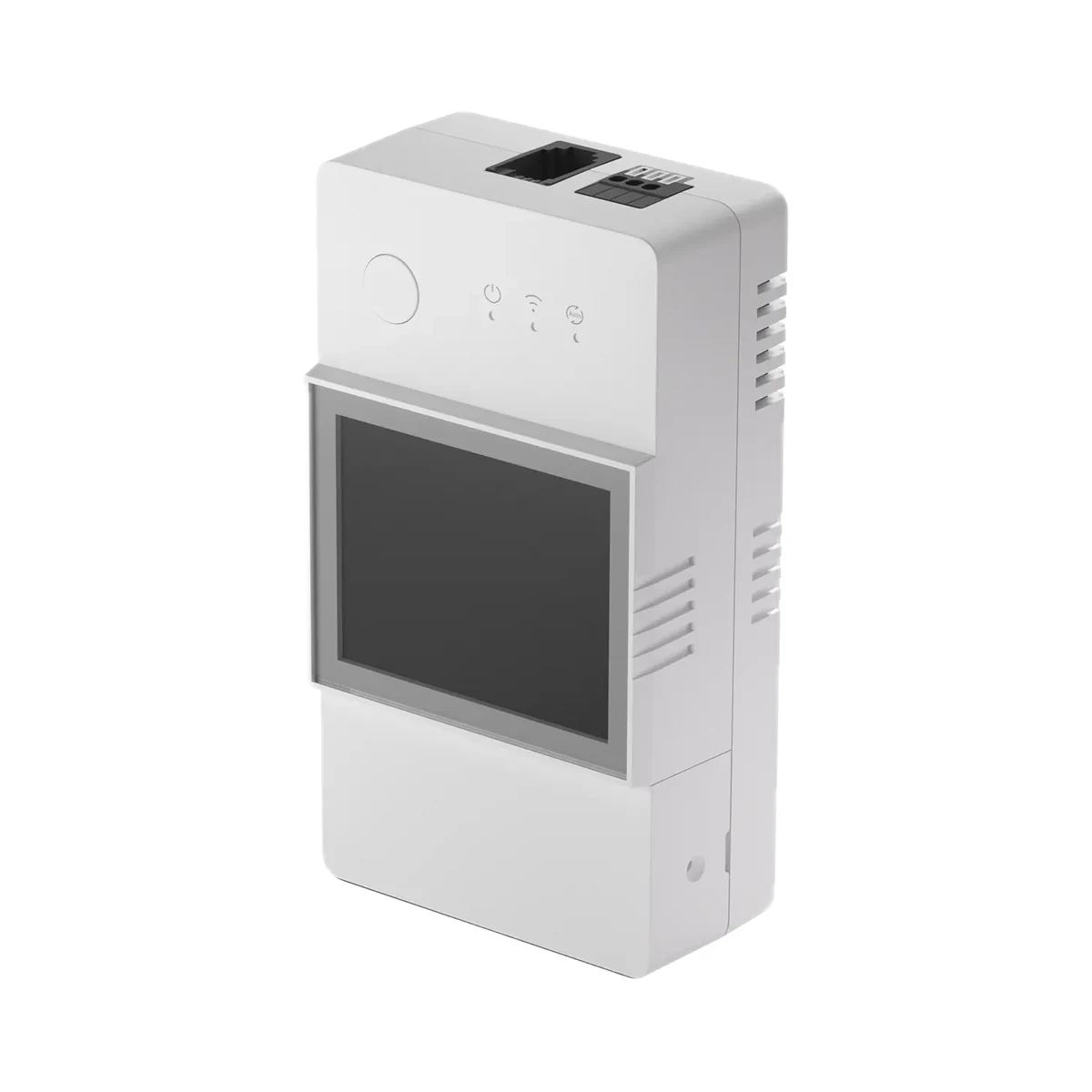
Sonoff TH Elite THR316D 16 A Wi-Fi thermostat relay with LCD display and dry contact
- Maximum load current
- 16 A
- Output type
- 230 V power relay, dry contact (potential-free)
- Dry contact rating
- 5–30 V, 1 A max
529 MDL
1 left
Sonoff · THR320D
Wi-Fi
Check the supported network band.
Manufacturer images
Space heaters and small floor-heating zones are heavy loads, yet the THR320D switches them directly at up to 20 A from a THS01, WTS01 or MS01 probe (sold separately), and its boiler dry contact switches together with the power relay.
Connects straight to a 2.4 GHz Wi-Fi router and is added in eWeLink. A hub running eWeLink CUBE is needed only for the Matter bridge.
We deliver across Moldova. Availability, delivery timing and cost are confirmed with a manager before order fulfilment.
The right choice starts with specifications
SKU: SONOFF-THR320D · Document model: THR320D
Specifications checked against the linked manufacturer documents. Load limits, package details and measurement conditions are retained.Checked 18 October 2026
Maximum load current — what it meansThe current the relay can switch directly. At 230 V with a resistive load (heating element, heater), 16 A is roughly 3.6 kW and 20 A roughly 4.6 kW; for pumps and motors the permitted power is lower. | 20 ATHR320D input/output: 100–240 V~, 50/60 Hz, 20 A max. The maker requires a circuit breaker of at most C20 A in the supply line [1] |
|---|---|
Dry contact rating — what it meansThe highest voltage and current the dry contact withstands. The circuit it controls (for example, a boiler’s thermostat input) must stay within these limits. | 5–30 V, 1 A maxThe maker does not state AC or DC. Dry-contact terminal wire: 0.13–0.5 mm², strip length 9–10 mm [1] |
Supply voltage — what it meansThe supply voltage (and current, if stated) as the maker gives it. It must match your mains or adapter. | 100–240 V AC, 50/60 Hz [1] |
| Rated impulse voltage | 2500 V [1] |
Output type — what it meansA power relay feeds 230 V to the load — a heater, heating element or fan. A dry contact only closes a circuit without supplying voltage: this is how gas boilers and other equipment with a room-thermostat input are connected. | 230 V power relay, dry contact (potential-free)Power output L Out (230 V live to the load) plus an NO/NC/COM dry contact. The dry contact switches in sync with the power relay and cannot be controlled separately [2] |
|---|---|
Automation by — what it meansWhich sensor readings the device uses to switch the load on and off by itself. Depends on the connected probe: humidity control needs a temperature-and-humidity sensor. | Temperature, air humidity, soil moistureAuto mode switches the load by temperature or air-humidity thresholds (humidity needs the THS01 sensor). Soil moisture works with the MS01 sensor: the maker describes automatic watering at a set moisture value (MS01 page). Only one sensor can be connected at a time [1] |
On-device display — what it meansWhether the device shows temperature and humidity on its housing, without a phone. Handy when the relay is in view: a panel with a clear cover, a greenhouse or a boiler room. | Yes43 × 33 mm LCD showing temperature and humidity, refreshed every 5 s [1] |
Thermostat works offline — what it meansWhether the on/off thresholds are stored in the device itself so regulation continues when Wi-Fi or internet drops. If not, the automation runs in the cloud or on a hub. | YesMaker: “Local Auto Mode”; a Wi-Fi disconnection does not affect the device's operation. Auto mode is toggled by double-pressing the button on the housing. Programs are set up in eWeLink [5] |
Number of automation programs — what it meansHow many separate rules (temperature or humidity threshold, active period) can be set in the device. Several programs allow, for example, different temperatures by day and by night. | 8Up to 8 Auto-mode programs: a temperature or humidity threshold plus an active period [6] |
| Display | LCD 43 × 33 mm, refreshed every 5 s [1] |
| Power-on state after outage | On / off / last state (set in eWeLink) [1] |
| Measurement history | Up to 6 months, hourly, export to .xlsx (in eWeLink) [1] |
| Control modes | Manual (button, app), Auto, schedule, timer, loop timer, scenes [1] |
Probe included — what it meansWhether an external probe is in the box. Without a probe the device works only as a plain relay, with no thermostat automation. | NoThe maker publishes no separate box-contents list. The official unboxing photo shows the box, manual, mounting base and the relay, with no sensor; the official store sells TH Elite only as 16A/20A variants, and the THS01, WTS01 and MS01 sensors are separate products [3] |
|---|
Compatible probes — what it meansExternal probe models the manufacturer lists as compatible. The probe determines measuring range, accuracy, cable length and water resistance. | SONOFF THS01 (temperature and humidity), WTS01 / DS18B20 (waterproof temperature probe), MS01 (soil moisture); RL560 extension cableManual V1.4 also lists the older AM2301 and Si7021 sensors, which need the adapter supplied with the sensor. With RL560 extension cables THS01 and WTS01 reach up to 60 m, MS01 up to 10 m [1] |
|---|---|
| Calibration | Temperature and humidity offset in eWeLink [1] |
Probe connector — what it meansHow the probe is connected. Probes with different connectors are not interchangeable without an adapter. | RJ94P4C) socket with hot plugging. The MS01 connects through the RJ9 adapter supplied with it [4] |
|---|---|
Mounting — what it meansHow and where it is installed: in a wall box, on a wall or ceiling, on a DIN rail, on a table or in a socket. | DIN railOn a 35 mm DIN rail via the mounting base. Recommended installation height: up to 2 m [6] |
Terminal wire cross-section — what it meansWire cross-section accepted by the power terminals, in mm². The higher the load current, the thicker the wire must be, so the upper limit matters for heavy loads. | 1.5–6.0 mm²Power terminals (L In, L Out, N). Dry-contact terminals: 0.13–0.5 mm² [1] |
Dimensions (W × H × D) — what it meansThe device’s size in millimetres as the maker states it. Check that it fits the wall box, niche or shelf. | 54 × 98 × 31 mmPublished as “98x54x31mm”; the maker's drawing shows 98 mm as height and 54 mm as width [1] |
| Dry-contact terminals | NO / NC / COM; wire 0.13–0.5 mm², strip 9–10 mm [1] |
| Upstream circuit breaker | Required, C20 A max [1] |
| Housing material | Polycarbonate (PC), V0 flame rating [1] |
Weight — what it meansThe device’s weight without packaging, per the maker. | 120 gNet weight for THR316D and THR320D [8] |
Certifications — what it meansStandards and certifications the maker lists for this model (for example CE, RoHS, Zigbee 3.0, Matter). | TÜV, CE, UKCA, WWA, FCC, RoHS, SRRC [4] |
Connectivity — what it meansThe wireless link or network the device uses. Wi-Fi connects straight to the router; Zigbee, Thread and Bluetooth Mesh work through a hub or gateway. | Wi-FiWi-Fi IEEE 802.11 b/g/n 2.4 GHz (5 GHz not supported). The phone's Bluetooth is used only when adding the device for the first time [1] |
|---|---|
Hub required — what it meansWhether the device needs a separate hub, gateway or coordinator to work in a smart home. If so, it is sold separately unless stated otherwise. | No hub neededConnects straight to a 2.4 GHz Wi-Fi router and is added in eWeLink. A hub running eWeLink CUBE is needed only for the Matter bridge [1] |
Works without internet — what it meansWhether the device keeps working over the local network or through a hub when the internet is down. Cloud features (remote access, voice assistants) need the internet. | YesLAN mode: eWeLink controls the device through the router without the cloud. Without internet, notifications, logs, firmware updates, scenes and sharing do not work. The button on the housing and Auto mode work without a network [1] |
Matter support — what it meansWhether the device supports the Matter standard, directly or through a bridge. Matter lets you add it to Apple Home, Google Home, Alexa and Home Assistant. | Via a bridgeNo built-in Matter. Maker: into Apple Home and other Matter systems through the eWeLink CUBE software Matter Bridge [1] |
Home Assistant — what it meansHow the device connects to Home Assistant: a built-in integration, a Zigbee coordinator, Matter or the maker’s cloud integration. | Via an add-on integrationMaker: SONOFF devices are added to Home Assistant through the eWeLink add-on. The eWeLink CUBE Matter Bridge is another route [7] |
App — what it meansThe maker’s app used to set up and control the device. | eWeLinkAndroid and iOS; eWeLink web control and IFTTT need an eWeLink VIP subscription. Voice control: Amazon Alexa, Google Assistant [6] |
Processor / radio chip — what it meansThe microcontroller or radio module inside, per the maker (for example ESP32). For firmware such as WLED and ESPHome it determines available features and whether the device can be re-flashed. | ESP32 [4] |
Operating temperature — what it meansThe air temperature range the device is rated for. The lower limit matters outdoors, on balconies and in unheated rooms. | −10…40 °C [1] |
|---|---|
Operating humidity — what it meansThe rated relative humidity range, non-condensing. | 5–95%Non-condensing [1] |
Colour — what it meansThe housing colour of this model. Other colours in the same series are separate products. | White [8] |
|---|
We deliver across Moldova. Availability, delivery timing and cost are confirmed with a manager before order fulfilment.
A website order is submitted for confirmation without charging your card. The payment method and final amount are agreed with a manager before payment.
The warranty is at least 12 months. The exact period and conditions for equipment and installation work are stated in the sales documents and the accepted proposal. Further support is agreed for each project.
Current conditions are published on the Return policy page. Email office@casasmart.md with your order number for the steps relevant to your situation. Statutory consumer rights continue to apply.
In your home
One thermostat cannot account for a sunny room, a closed bedroom and different schedules. Zoning helps avoid overheating and unnecessary heating.
See the complete solution
CasaSmart
Thermostat relays
Radiator thermostat valves
Temperature & humidity
Temperature & humidity
Buy just a device, add installation, or hand the whole project over to us.